> For the complete documentation index, see [llms.txt](https://hntech.gitbook.io/blueconda-documentation/llms.txt). Markdown versions of documentation pages are available by appending `.md` to page URLs; this page is available as [Markdown](https://hntech.gitbook.io/blueconda-documentation/advancing-on-experienced/using-colors-and-tips.md).
# Using Colors and Tips
{% hint style="info" %}
From this point on, I assume you've grasped the basics. That's why the documentation will be more fast paced from here on.
{% endhint %}
## The Color Picker
Suppose you want to set a color for some text in tkinter:\
`tk.Label(foreground="red")`
You'd think you're limited to colors in words, such as red, green, blue. But no, most Python applications support colors as HEX too, meaning you can use any color you like!
{% hint style="info" %}
HEX colors are in the format #RRGGBB. The RGB color system defines a unique color based off how much red, green, and blue (the 3 primary colors) is present. The amount of each color present is given in a number from 1 - 255. HEX colors represent this decimal number in hex format, allocation two characters for each of the 3 colors. The hash (#) at the start indicates that the values are HEX.
{% endhint %}
Line up your caret (the text cursor) with where you want the color to be inserted. Then press the color button:
The color button
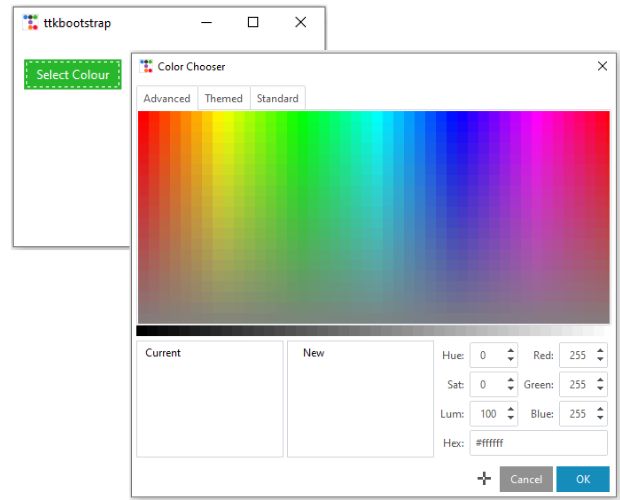
Upon clicking it, the color choosing window pops up:
The color choosing window, based off ttkbootstrap.colorchooserdialog
Select your color and click OK. the color will be inserted to wherever your caret was in HEX format.
## Random Tip
This feature plays no actual weight in your programming experience.\
Click this button:
Tip button
A random tip appears!
I wonder if you knew that
Might be used for inspiration, or actual benefit to your coding experience.
{% hint style="info" %}
Currently there are 33 tips in V 1.0 hard coded into the app, and a random one is given each time. I plan to add more tips with each update.
{% endhint %}